Securing Hazelcast (tcp) traffic with Stunnel
Hazelcast is a distributed in-memory data grid, which allows data to be shared evenly among nodes in clustered environments. The open source version of Hazelcast does not support encryption in transit or even at the cache level. So in order to secure traffic in the Hazelcast cluster, we need to extend it by making some code changes, which may not always be an option.
There is however another way to secure the transport by using stunnel. As the official documentation states, “Stunnel is a proxy designed to add TLS encryption functionality to existing clients and servers without any changes in the programs’ code”. This sounds like a perfect option in our case, and allows us to decouple encryption from our Hazelcast applications.
The diagram below illustrates how stunnel can be used to enable transport encryption, using Mutual TLS Authentication, on a two-node cluster.
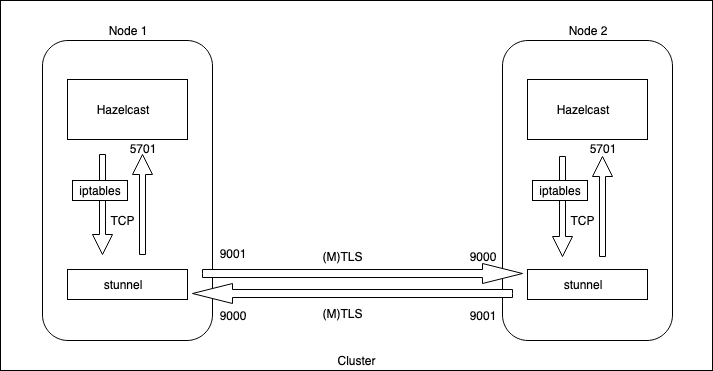
As shown, we need to do the following in order to set it up:
- Create a certificate to encrypt the transport.
- Set up two tunnels (inbound, and outbound) on each node.
- Use iptables to redirect outbound traffic to stunnel locally.
Note: In this example Hazelcast is set up with TCP/IP discovery and multicast disabled. This method can be used on cloud environments, like AWS*, that don’t allow multicast.*
Also make sure that the security groups (or firewall) allow the inbound and outbound traffic on the given ports.
Create a certificate
Let’s first create a self-signed certificate for encryption. Below are the commands that create a root CA and the certificate.
# Create a root CA key and certificate
openssl genrsa -out ca.key 4096
openssl req -new -x509 -sha256 -days 365 -key ca.key -out ca.crt

# Create a rsa key file
openssl genrsa -out server.key 4096

# Create a certificate request
openssl req -new -key server.key -sha256 -out server.csr

# Create the cert
openssl x509 -req -days 365 -sha256 -in server.csr -CA ca.crt -CAkey ca.key -set_serial 1 -out server.crt
(Optional) Below are the steps to create a client certificate for mutual authentication (MTLS/MASSL).
# Create key
openssl genrsa -out client.key 4096

# Create a client csr
openssl req -new -key client.key -out client.csr

# Create the client cert signed by the same root CA
openssl x509 -req -days 365 -sha256 -in client.csr -CA ca.crt -CAkey ca.key -set_serial 2 -out client.crt
Copy the cert files to both nodes under /opt/certs.
Setting up stunnel
Stunnel is available in almost all Linux distributions; the command below installs it on CentOS.
sudo yum install stunnel
Now we create two configuration files on each node, let’s call them hc-client.conf (for outbound traffic) and hc-server.conf (for inbound traffic) at /etc/stunnel.
The example below assumes Mutual TLS Authentication, but it can be disabled by removing the client cert and key from the hc-client.conf file, and by removing client verification from hc-server.conf file.
hc-client.conf
[hazelcast-out]
client = yes
accept = 9001
connect = <remote-node-ip>:9000
verify = 2
CAfile = /opt/certs/ca.crt
cert = /opt/certs/client.crt
key = /opt/certs/client.key
The configuration above, on the client side, will receive the traffic from the local Hazelcast node on port 9001, and will proxy it through the encrypted tunnel to the remote node listening on port 9000.
hc-server.conf
[hazelcast-in]
accept = 9000
connect = <local-node-ip>:5701
verify = 2
CAfile = /opt/certs/ca.crt
cert = /opt/certs/server.crt
key = /opt/certs/server.key
The server side configuration will receive the TLS traffic on port 9000 from the remote client node and will redirect it to the local Hazelcast instance running on port 5701, after off-loading TLS encryption.
All communication between stunnel and Hazelcast will be unencrypted.
Below is how we run stunnel, with the above configuration files, on both nodes:
sudo stunnel /etc/stunnel/hc-client.conf
sudo stunnel /etc/stunnel/hc-server.conf
Redirect outbound-traffic from local Hazelcast instance to stunnel
Now that the tunnels are set up, we need to redirect out-going Hazelcast traffic to stunnel so that it can pass through the TLS encrypted channel. In order to do this we will set up the routing rule below using iptables on both nodes.
sudo iptables -t nat -A OUTPUT -p tcp \
 -d <remote-node-ip> --dport 5701 -j DNAT --to-destination 127.0.0.1:9001
Once the routing rule is set up, the outbound Hazelcast traffic will flow through the encrypted tunnel.
Conclusion
The above post explained how to decouple transport encryption from Hazelcast applications, by channeling unencrypted traffic (inbound and outbound), through TLS encrypted tunnels. This method can be used to encrypt the TCP traffic between applications in general, and not just Hazelcast.
Also published on Medium, in The Startup.